RPI as ESP Programmer
Software Requirements
ESPTool Dependencies
First run the following command with the sudo command prefix to get the latest stable esptool release.
sudo pip install esptool
Next, navigate to a directory in which you wish to install the esptool script. For this document the location will be home/pi. And run the following command.
git clone https://github.com/espressif/esptool.git
Once the repository is cloned, the esptool will be available for use.
Raspberry Pi OS Requirements
In order for the pi to communicate with the ESP32, serial must be enabled in the raspi-config menu. Enter the following command to open the menu.
sudo raspi-config
Next, select interfacing options followed by Serial Port and then Yes to enable use of the serial port. To exit the raspi-config menu, click the right arrow on the keyboard until Back is highlighted on the screen followed by enter. You should now be back in the main menu. Click right arrow again until Finish is highlighted then click enter.
Physical Requirements
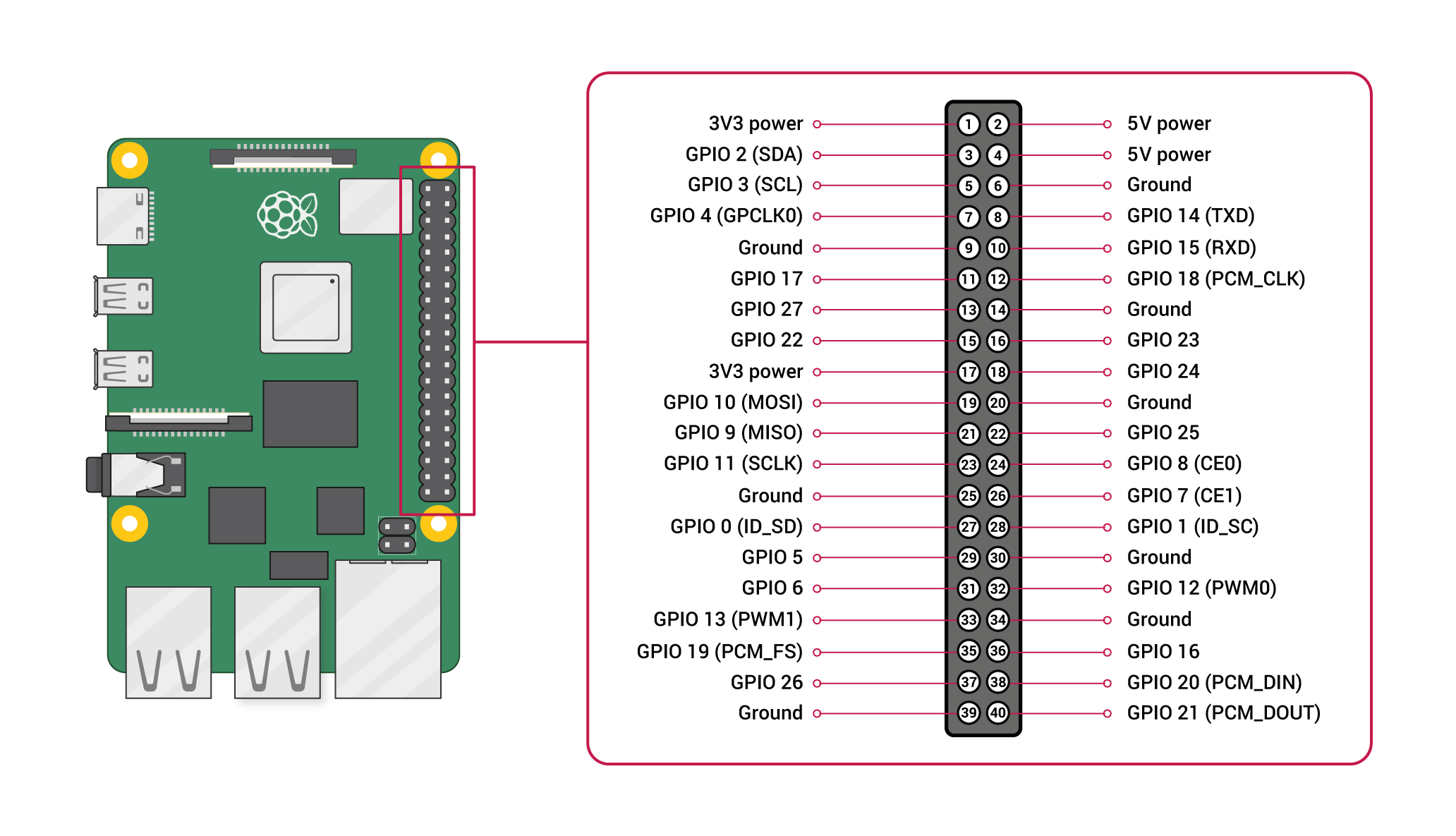
To electrically connect the Raspberry Pi to the ESP32 Chip, the following three lines need to be connected from the 40 pin GPIO header:
- GPIOP 14 (TXD) - Pin 8
- GPIO 15 (RXD) - Pin 10
- Ground (GND) - Pin 6, 9, 14, 20, 25, 30, 34, or 39
The following shoes a rudimentary wiring diagram of the electrical connections between the two devices. You may notice that IO0 is tied to ground which tells the EPS32 to enter the serial bootloader.
Flashing the ESP32
The following is a an example of a command I have used to flash an esp32 chip.
sudo esptool.py --chip esp32 --port /dev/ttyUSB1 -b 921600 --before default_reset --after hard_reset write_flash -z --flash_mode dio --flash_freq 80m --flash_size detect 0xe000 /home/pi/boot_app0.bin 0x1000 /home/pi/app.ino.bootloader.bin 0x10000 /home/pi/app.ino.bin 0x8000 /home/pi/app.ino.partitions.bin
Below is help for the esptool.py command
pi@raspberrypi:~ $ esptool.py -h
usage: esptool [-h]
               [--chip {auto,esp8266,esp32,esp32s2,esp32s3beta2,esp32s3,esp32c3,esp32c6beta,esp32h2beta1,esp32h2beta2,esp32c2}]
               [--port PORT] [--baud BAUD]
               [--before {default_reset,usb_reset,no_reset,no_reset_no_sync}]
               [--after {hard_reset,soft_reset,no_reset,no_reset_stub}]
               [--no-stub] [--trace] [--override-vddsdio [{1.8V,1.9V,OFF}]]
               [--connect-attempts CONNECT_ATTEMPTS]
               {load_ram,dump_mem,read_mem,write_mem,write_flash,run,image_info,make_image,elf2image,read_mac,chip_id,flash_id,read_flash_status,write_flash_status,read_flash,verify_flash,erase_flash,erase_region,merge_bin,get_security_info,version}
               ...

esptool.py v3.3.3 - Espressif chips ROM Bootloader Utility

positional arguments:
  {load_ram,dump_mem,read_mem,write_mem,write_flash,run,image_info,make_image,elf2image,read_mac,chip_id,flash_id,read_flash_status,write_flash_status,read_flash,verify_flash,erase_flash,erase_region,merge_bin,get_security_info,version}
                        Run esptool {command} -h for additional help
    load_ram            Download an image to RAM and execute
    dump_mem            Dump arbitrary memory to disk
    read_mem            Read arbitrary memory location
    write_mem           Read-modify-write to arbitrary memory location
    write_flash         Write a binary blob to flash
    run                 Run application code in flash
    image_info          Dump headers from an application image
    make_image          Create an application image from binary files
    elf2image           Create an application image from ELF file
    read_mac            Read MAC address from OTP ROM
    chip_id             Read Chip ID from OTP ROM
    flash_id            Read SPI flash manufacturer and device ID
    read_flash_status   Read SPI flash status register
    write_flash_status  Write SPI flash status register
    read_flash          Read SPI flash content
    verify_flash        Verify a binary blob against flash
    erase_flash         Perform Chip Erase on SPI flash
    erase_region        Erase a region of the flash
    merge_bin           Merge multiple raw binary files into a single file for
                        later flashing
    get_security_info   Get some security-related data
    version             Print esptool version

optional arguments:
  -h, --help            show this help message and exit
  --chip {auto,esp8266,esp32,esp32s2,esp32s3beta2,esp32s3,esp32c3,esp32c6beta,esp32h2beta1,esp32h2beta2,esp32c2}, -c {auto,esp8266,esp32,esp32s2,esp32s3beta2,esp32s3,esp32c3,esp32c6beta,esp32h2beta1,esp32h2beta2,esp32c2}
                        Target chip type
  --port PORT, -p PORT  Serial port device
  --baud BAUD, -b BAUD  Serial port baud rate used when flashing/reading
  --before {default_reset,usb_reset,no_reset,no_reset_no_sync}
                        What to do before connecting to the chip
  --after {hard_reset,soft_reset,no_reset,no_reset_stub}, -a {hard_reset,soft_reset,no_reset,no_reset_stub}
                        What to do after esptool.py is finished
  --no-stub             Disable launching the flasher stub, only talk to ROM
                        bootloader. Some features will not be available.
  --trace, -t           Enable trace-level output of esptool.py interactions.
  --override-vddsdio [{1.8V,1.9V,OFF}]
                        Override ESP32 VDDSDIO internal voltage regulator (use
                        with care)
  --connect-attempts CONNECT_ATTEMPTS
                        Number of attempts to connect, negative or 0 for
                        infinite. Default: 7.